Nextcloud Office Desktop, Tested: A Free Office Suite That Opens Real .docx and .xlsx Files
Microsoft 365 is a subscription that never ends, and every small business we know has a folder full of .docx quotes and .xlsx invoices that must keep opening. Nextcloud Office Desktop is the new free answer: a desktop office suite, released November 13, 2026, that edits Word, Excel and PowerPoint files offline, with no account and no server. It reached the Hacker News front page on November 27 (400+ points) and Product Hunt on November 29. We installed v9.3.8 on Ubuntu 24.04 the hard way — a stalled installer, a Microsoft licence prompt, and four missing libraries — then edited our own quote and invoice and checked the saved files byte by byte. Every result below is from that run.
1. What Nextcloud Office Desktop is
Nextcloud Office Desktop is a free desktop office suite — word processor, spreadsheet, presentation and PDF editor in one app — built on Euro-Office, a European-led open-source office suite. It opens and saves Microsoft formats (.docx, .xlsx, .pptx) natively, works fully offline on local files, and can optionally connect to one or more Nextcloud servers for cloud storage and real-time co-editing. Unlike the browser version of Nextcloud Office, the desktop app needs no server at all: no account, no sign-in, no subscription. The installers are published by Nextcloud (signed builds) from the nextcloud-releases/Office-DesktopEditors repository on GitHub.
Attribution: Nextcloud Office Desktop is by Nextcloud, built on Euro-Office (AGPLv3). This tutorial is based on our own hands-on test — the install, the errors, the edits and the file checks are ours; the release notes and announcements are quoted only where we say so.
2. Install — what we actually did
We downloaded the official signed .deb from the project's GitHub releases (nextcloud-releases/Office-DesktopEditors, tag v9.3.8): file nextcloud-office-nextcloudoffice_9.3.8-0_amd64.deb, 329 MB. Its SHA-256, computed on our own machine, is:
4d24d9772260757a50266385d760deefe804a915a94b3a79987ae390fca37a51
Check the hash before you install — if it does not match, do not install the file. On a fresh Ubuntu, update the package index first (sudo apt-get update); ours was empty after a restart and the install failed with "not installable" until we did. Then install with this command, not the plain one:
sudo apt install --no-install-recommends ./nextcloud-office-nextcloudoffice_9.3.8-0_amd64.deb
The --no-install-recommends matters. A plain install also pulls in ttf-mscorefonts-installer, whose setup stops and asks you to accept a Microsoft font EULA ("Do you accept the EULA license terms? [yes/no]") — an unattended install stalls there, and we do not accept third-party licence agreements on your behalf. Skipping the recommends avoids it entirely; the app does not need those fonts. Then add the four libraries the package forgot to declare:
sudo apt install -y libegl1 libxcb-icccm4 libxcb-keysyms1 libxcb-xinerama0
Without libegl1 the app refuses to start at all (error while loading shared libraries: libEGL.so.1) — the same error another tester hit on Ubuntu 26.04, even though the v9.3.8 changelog claims a fix for missing Debian dependencies. Without the three libxcb packages, Qt's xcb platform plugin fails to load. After those four, ldd reports zero missing libraries and the app installs to /opt/nextcloud-office/nextcloudoffice/DesktopEditors. On a full desktop Ubuntu these libraries are usually already present, so most people will never see this — it bites minimal and server installs.
3. Our test: a real quote and a real invoice, edited and checked
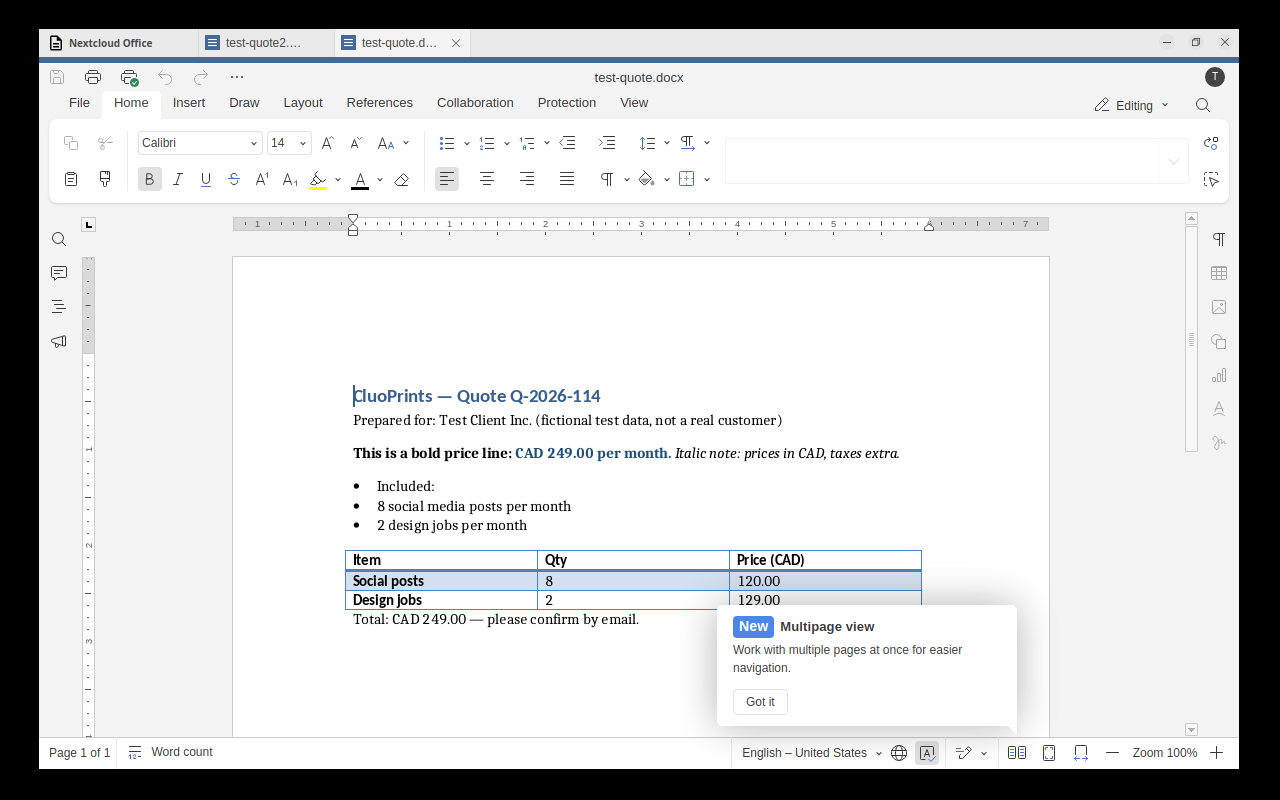
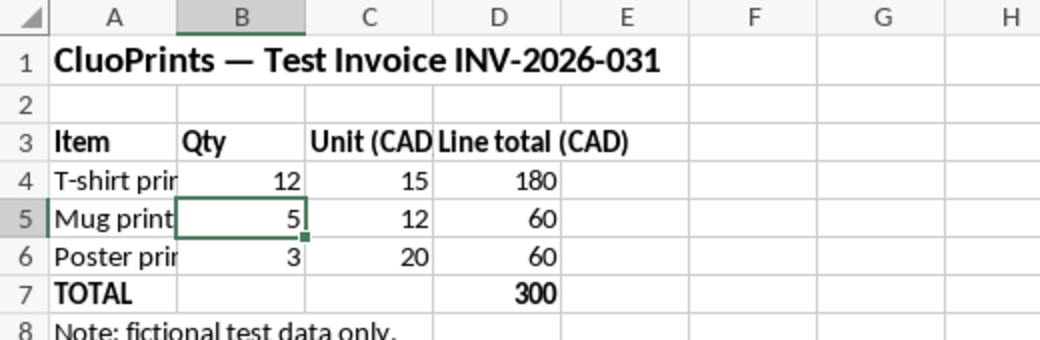
We set five test questions before touching anything, and scored each one against a real result — not a reading of the docs. The test files were our own inventions: a one-page quote (.docx — blue Heading 1, a bold price line, an italic note, three bullets, a 3-row table) and an invoice (.xlsx — quantities, unit prices, =B4*C4 line totals, =SUM(D4:D6) total of 270). We ran the app as a normal user under Xvfb (a virtual display, no monitor) with --disable-gpu --disable-dev-shm-usage, because the machine has no graphics card; on a normal desktop you just double-click the file.
| Test | Result | What we observed |
|---|---|---|
| Install on Ubuntu 24.04 | Partial | The .deb installs, but only after apt-get update, with --no-install-recommends to dodge the Microsoft font EULA prompt, and with four extra libraries (libegl1, libxcb-icccm4, libxcb-keysyms1, libxcb-xinerama0) that the package does not declare. One of those four is the difference between "installed" and "starts". |
| Launch with no display and no account | Pass* | As a normal user under Xvfb with --disable-gpu, the app starts and opens files. No account, no sign-in, no server — and we saw zero network connections from the app while it ran. The asterisk: as the root user it aborts during startup (Gtk-ERROR: Can't create a GtkStyleContext without a display connection), and without --disable-gpu its GPU process dies on a machine with no graphics card. Neither affects a normal desktop. |
| .docx round-trip: edit and save | Pass | We added a line at the end of our quote and saved with Ctrl+S. Re-reading the saved file with python-docx: 8 paragraphs (was 7), the new line present verbatim, the table's 3 rows and all cells intact, bold runs still bold, italic runs still italic. Nothing lost. |
| .xlsx formulas: edit and recalculate | Pass | Our invoice opened with all formulas already computed (150, 60, 60, total 270). Changing quantity 10 to 12 recalculated live: line total 150 → 180, grand total 270 → 300. After saving, openpyxl confirms the formulas are still there (=B4*C4, =SUM(D4:D6)) and every value is exactly as expected. |
| Offline, no account | Pass | Every step above used local files only. The app never asked for an account, never asked for a server, and opened no network connections during the whole test. The "no account needed" claim is true. |
4. What it cannot do (and what we did not test)
- Not tested: presentation (.pptx) editing, the built-in PDF editor, real-time co-editing (needs a Nextcloud server), macros and VBA, and very large or complex files. We do not claim any of these work — they are outside this test.
- No self-update yet. The app does not update itself; when a new version ships you download it and install it the same way again.
- Two names, one app. The window title says "Nextcloud Office" but document tabs say "Euro-Office". It is the same application — the signed Nextcloud build of the Euro-Office code — but the mixed branding is confusing the first time you see it.
- Minimal Linux installs need the extra libraries. If you run a server or a stripped-down Ubuntu, budget the four packages in section 2. A full desktop install usually already has them.
- The ONLYOFFICE question. Euro-Office is built from a fork of ONLYOFFICE's code, and ONLYOFFICE has publicly disputed the fork. For a user the practical effect is nil on day-to-day use — the app is free under AGPLv3 and works — but its future depends on the Euro-Office/Nextcloud side, not on ONLYOFFICE. If you already pay for ONLYOFFICE, this changes nothing for you.
5. Safety and compliance
- Download from the official channels only: the install page at
nextcloud.comor thenextcloud-releases/Office-DesktopEditorsrepository on GitHub. Unsigned community builds exist under the Euro-Office name; the signed Nextcloud build is the recommended one. Verify the SHA-256 before installing. - Your files stay yours. In our test the app made no network connections and asked for no account. Local files are edited locally; nothing is uploaded unless you connect a server yourself.
- Only edit files you own or have the right to edit. Our test files were our own inventions — a fictional quote and a fictional invoice, no real customer data anywhere in this test.
- Licence: AGPLv3, confirmed in the installed
LICENSE.txt. Free to use, including commercially, under that licence's terms.
6. FAQ
Is it really free? Do I need a Nextcloud account?
Yes, free — AGPLv3, no subscription, no trial, no paywall inside the app that we saw. And no, you do not need a Nextcloud account to edit files on your own computer. We never created an account, never signed in, and the app never asked. An account only matters if you want cloud storage or real-time co-editing, which need a Nextcloud server.
How do I install it on Ubuntu or Debian?
Download the .deb from the official GitHub releases, check its SHA-256, run sudo apt-get update, then sudo apt install --no-install-recommends ./nextcloud-office-nextcloudoffice_9.3.8-0_amd64.deb — the flag skips a Microsoft font package whose EULA prompt stalls an unattended install. Then add the four libraries the package forgot: sudo apt install -y libegl1 libxcb-icccm4 libxcb-keysyms1 libxcb-xinerama0. Without libegl1 the app will not start at all. Start it from your applications menu.
Will it mess up my Word and Excel files when I save?
Not in our test. A quote with a heading, bold and italic text, bullets and a table survived a save with every run and cell intact. An invoice with formulas survived too — quantities, prices, =B4*C4 and =SUM(D4:D6) all still there after saving, and the totals recalculated correctly. That is one small, clean file each, not a 200-page contract with tracked changes: keep a backup of anything important before the first save, as you would with any new editor.
Nextcloud Office, LibreOffice, or ONLYOFFICE — which should a small business pick?
It depends what you optimise for. LibreOffice is the broadest free suite (six apps, mature, defaults to OpenDocument formats) and the safest default if you rarely share files with Microsoft Office users. Nextcloud Office Desktop is the better pick if your files live in Microsoft formats and you want them to stay that way — it uses .docx/.xlsx/.pptx natively — and if you already run (or plan to run) Nextcloud. ONLYOFFICE Desktop Editors is the closest cousin: same interface family, same format-first approach, and the original upstream of this app's code; pick it if you want the vendor that wrote the engine. All three are free for this use; the difference is defaults, not price.
What is its relationship with ONLYOFFICE? Does the licence dispute affect me?
Euro-Office, the engine inside Nextcloud Office Desktop, is a fork of ONLYOFFICE's open-source code, maintained independently under AGPLv3. ONLYOFFICE has publicly disputed the fork. For a user editing local files, nothing changes: the app is free, the licence is valid, and your files are yours. The dispute matters to the projects, not to your Tuesday invoice — but it is why we say "fork" plainly instead of pretending the history is simple.
Does it run on Windows and Mac? What about older computers?
Yes on Windows 10 and 11 (x64 and ARM64) and on Apple Silicon Macs (M1 and newer — there is no Intel Mac build). Linux gets .deb and .rpm packages plus a portable archive. It needs about 1.7 GB of disk and a 64-bit machine; on our 4-core test VM it ran fine. One gap: the app does not update itself yet, so check for new versions yourself now and then.
Want a website built this way — tested, not just claimed?
This tutorial exists because we run these checks on our own site first. That is the same habit we bring to client work. Our website services build bilingual (English/French) sites for small businesses from C$699 — hand-checked code, modern patterns, and a free preview before you pay. Already have a site? Start with our free tools, or ask us for a modernisation pass: we will test it, show you what actually works, and fix what matters.
Want it printed?
We can put your design on T-shirts, hoodies, mugs, posters and more — printed to order in Quebec, no minimums, with a free preview before you pay.
Contact us for a free quote